


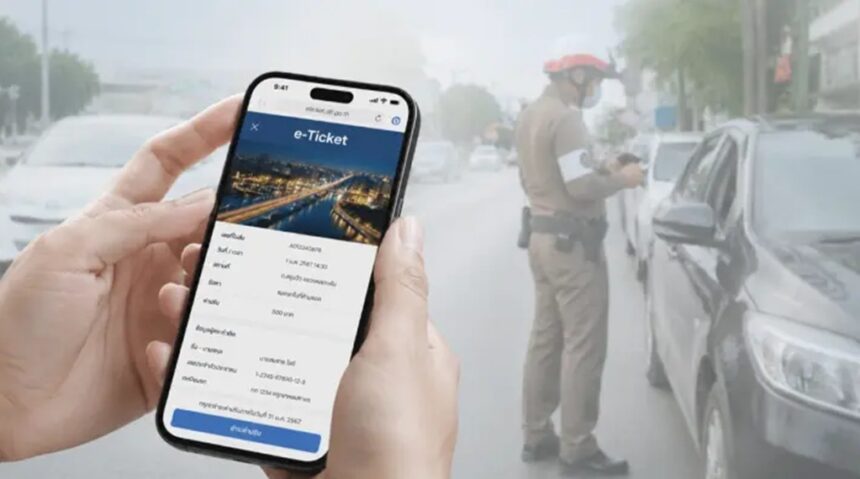
A traffic ticket in Thailand can leave you unsure how to pay, especially if you’re visiting and don’t have easy access to Thai banking. The Royal Thai Police’s PTM e-Ticket portal handles online traffic-ticket services, but the options available depend on your ticket and circumstances.
Check the ticket details and payment instructions first, then use the portal or another route listed on the notice. The steps below show how to look up a ticket, make a payment, keep proof, and address problems if the record or payment doesn’t go as expected. For more on how to verify and pay a Thai traffic ticket, start with the notice itself.
Key Takeaways
- Check the ticket number, offense, fine amount, and due date, then use the Royal Thai Police PTM e-Ticket portal to look up an electronic ticket.
- Follow the payment options shown for your ticket. These may include a debit or credit card, or QR payment through Thai mobile banking.
- If you can’t log in or use Thai mobile banking, check whether a listed payment counter or the police station named on the ticket can accept payment.
- Keep your ticket and payment receipt or confirmation until the fine shows as paid. The Tang Rat app may support QR payments for eligible bills.
- Ignore unsolicited SMS payment links and QR codes. Verify the ticket through an official channel, and follow the deadline printed on the notice.
How to Pay Traffic Fines in Thailand Online, Step by Step
Before paying, check the instructions on your ticket and confirm that the online record matches it. The Royal Thai Police PTM e-Ticket portal can handle electronic tickets, but available payment options depend on the ticket and your access to Thai banking.
Gather the ticket and vehicle details first
Keep the ticket nearby so you can enter its details accurately. You may need the ticket number or other information printed on the notice, your license plate number, and vehicle details such as the registration province.
The printed ticket is your best guide to the issuing authority, payment deadline, and accepted methods. Follow those instructions if they differ from general online guidance. A handwritten ticket may require payment at the police station named on it, rather than through the portal. If an officer issued the ticket at a checkpoint, review what to do at a Thai police checkpoint before proceeding.
Look up the ticket in the PTM e-Ticket portal
Go to the Royal Thai Police’s official PTM e-Ticket portal at ptm.police.go.th/eTicket. Check the web address before entering personal information, and avoid using payment links sent in unsolicited messages.
Enter the details the portal requests, then compare the result with your notice. Confirm that the ticket number, vehicle registration, violation, fine amount, and deadline all match. If the record is missing or any detail looks wrong, don’t pay until you can verify it with the issuing authority.
The portal may request Thai identification or login details. Foreign visitors may not be able to register, and they should not try to bypass identity checks. If you can’t access the portal, follow the payment instructions printed on your ticket or contact the listed police station.
Choose a payment method and complete the payment
If the ticket appears in PTM, review the payment options shown for that specific notice. Online card payment may be available. An electronic ticket may also include a QR code that you can scan using a mobile banking app.
However, foreign cards may not work reliably, and Thai mobile banking generally requires a Thai bank account. Don’t assume every ticket accepts every method. Before authorizing payment, check the ticket details and amount once more, then save the confirmation or receipt.
Save proof and confirm the ticket is paid
Keep the portal confirmation, payment reference, and any bank or card receipt. A text message may arrive later, so don’t rely on an SMS alone as proof.
To check the status, return to PTM and look up the ticket again. If the payment doesn’t appear, keep your receipt and contact the reported PTM payment support line at 1220. Verify the number through an official channel before calling. For added caution, follow the Royal Thai Police warning about fake traffic-fine payment messages.
What to Do If You Cannot Pay Through the Online Portal
If PTM won’t accept your details or payment, check the ticket for another approved option before trying a different channel. The ticket and the provider’s current rules determine where you can pay, so confirm eligibility before handing over money.
Try another listed payment channel for an electronic ticket
Some electronic tickets may be paid at Krungthai Bank branches or ATMs, through Krungthai NEXT, at 7-Eleven, or at Thailand Post. Krungthai also lists several payment routes for traffic tickets, including its branches, ATMs, mobile app, and post offices. Check Krungthai’s traffic ticket payment options for its listed channels.
Before you go, confirm that the specific electronic ticket is accepted there. Check the payment reference and any service fee, then make sure the amount matches your notice. Keep the printed receipt or digital confirmation until the ticket status shows as paid. For additional context on official traffic fine payment channels in Thailand, follow the instructions tied to your ticket rather than assuming every method works for every notice.
If you are a foreign visitor, use the ticket’s payment instructions
PTM access may require Thai identification details, and visitors without those details may not be able to register or log in. Foreign cards may also be declined, while Thai mobile banking usually requires a Thai bank account.
If you can’t use PTM, follow the payment instructions printed on the ticket. You can also contact the issuing police station and ask which in-person option it accepts for that notice. Don’t assume that a particular shop counter will take payment, or that another person can pay safely on your behalf without authorization.
Handle handwritten tickets and missing ticket records carefully
A handwritten or on-the-spot notice may not appear in PTM. It may direct you to pay at a specific police station, so contact the station named on the ticket if the record is missing or a payment channel rejects it.
Call the station before making a trip if the license plate, ticket number, or other details don’t match. Have the notice ready and ask how to resolve the discrepancy. Don’t pay a different ticket based only on a text message. Verify the notice through PTM or the issuing station, and use only the payment reference and channels confirmed for your ticket.
Know the Deadline, Avoid Scams, and Fix Payment Problems
After checking your ticket, follow its stated due date and use a verified payment channel. Keeping the notice and payment records together can help you avoid missed deadlines, fraudulent links, and repeat charges.
Use the deadline printed on your ticket
There isn’t one deadline that applies to every Thai traffic ticket. Some general guidance describes seven days as typical, but the time allowed can vary by ticket. Use the due date printed on your notice, rather than assuming a standard period applies.
If the date is missing, unclear, or appears inconsistent with what the issuing officer told you, contact the police station or authority named on the ticket. Confirm the deadline and accepted payment methods before you pay. For more context on Thailand’s unpaid traffic ticket rules, check the relevant details for your notice instead of relying on a general timeline.
Spot fake traffic-fine messages before you pay
Treat an unexpected text that demands immediate payment with caution. Don’t tap its payment link or scan a QR code it contains. Instead, open the PTM e-Ticket portal yourself, or check through an official police app or channel. You can also compare the message with Thai PBS’s advice on checking fake traffic-fine texts.
Before paying, match the ticket number, vehicle registration, violation, and amount against your notice and the official record. If a detail differs, stop and contact the issuing authority. Never enter banking passwords, one-time codes, or card details on a page reached through an unsolicited message.
Know what to do if payment is delayed or duplicated
If the portal still shows a ticket as unpaid after you made a payment, check your bank or card account first. Confirm whether the transaction is pending, declined, or completed, and save the receipt or transaction reference. Don’t pay again until you know whether the first charge went through.
If money left your account but the ticket remains unpaid, contact your bank, card provider, or official PTM support. Provide the payment reference and ticket details, and keep a record of when you contacted them and what they advised.
For a duplicate charge, ask the bank or payment provider how to dispute it. Keep both transaction records, your ticket, receipts, and any support messages until the matter is resolved.
Frequently Asked Questions
A few details can still cause confusion after you check the ticket and choose a payment route. These answers cover common issues for visitors and drivers who can’t complete payment through the portal.
Can I pay a Thailand traffic fine without a Thai bank account?
Possibly. Some tickets offer card payment, and an accepted counter channel may be available, but the options depend on the ticket and payment provider. Foreign cards don’t always work reliably, so check the instructions printed on your notice before choosing a method. If they don’t list a workable option, ask the issuing authority which alternatives it accepts.
Can tourists use the PTM e-Ticket portal?
The portal may request Thai identification or login details, and it isn’t always clear whether visitors without Thai identification can register. A report on PTM ticket checks and registration describes registration using an ID card, so tourists may not be able to access every feature. If you can’t log in, use the payment instructions on your ticket or contact the issuing police station.
How long does it take for an online payment to show as complete?
Processing and ticket-status updates can take time, and the delay may vary by payment method. Keep your receipt or transaction reference while you wait, then check the ticket record through the official system. If the ticket still appears unpaid, don’t submit another payment until you’ve confirmed the first transaction did not go through.
Can I pay a handwritten traffic ticket online?
A handwritten ticket may not appear in the electronic system, so online payment might not be available. The notice may direct you to pay at the police station that issued it. Follow the instructions on the ticket, or contact that station to confirm where and how it accepts payment.
What should I do if I cannot find my ticket online?
First, recheck the ticket number, license plate, and vehicle details for typing errors. If the record still doesn’t appear, contact the issuing authority and ask it to confirm the ticket and approved payment method. Compare the notice details carefully, including the violation and amount; general references such as Thailand’s traffic fine rates may offer context, but the issuing authority must verify your specific ticket. Don’t pay an unrelated ticket or respond to an unsolicited payment request.
Conclusion
Paying a Thailand traffic fine starts with checking that the ticket details are correct, then following its stated deadline and payment instructions. Use PTM or another option accepted for that ticket, and keep your receipt or confirmation until the payment is recorded.
For foreign visitors, portal access and payment options may differ. If anything is unclear, confirm the details with the issuing police station before paying. Knowing the traffic rules and penalties in Thailand can also help you understand the notice and what it covers.