



If you already pay for everything with Google Pay, this new card will feel like a natural next step. The Google Pay Flex Axis Bank Credit Card gives you a real credit line in your digital wallet so that you can tap, scan, and pay like UPI, with rewards on top. You handle everything inside the app, from tracking spending to paying bills, which feels a lot easier than old-style banking.
In this guide, the card is explained in plain language: how it works with UPI and contactless payments, how the rewards and Stars system work, what to expect on credit limit and fees, how to apply, and who should or should not use it. The aim is to keep it clear and honest, not to sell you anything.
What is the Google Pay Flex Axis Bank Credit Card?
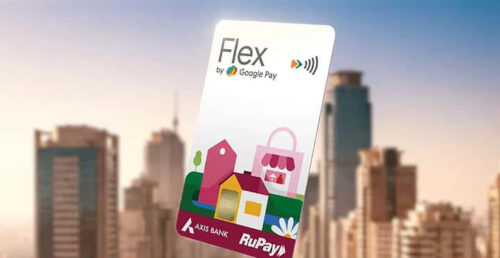
The Google Pay Flex Axis Bank credit card is a co-branded, digital-first credit card from Google Pay and Axis Bank. It runs on the RuPay network and sits inside your Google Pay app as part of your digital wallet.
The card can be used for online transactions and for offline contactless payments at merchants that accept RuPay credit cards. It also supports UPI, so you can scan a QR code and pay using your credit limit rather than your bank balance.
Onboarding is fully digital. Users see the offer inside Google Pay, share basic details, complete KYC, and receive a virtual card in minutes if approved. Google describes this model in more detail in its official post on Flex by Google Pay.
How the Google Pay and Axis Bank partnership works
This card is a classic co-branded product.
- Google Pay provides the app, UPI layer, and digital wallet experience.
- Axis Bank provides the credit line and handles billing, interest, limits, and compliance.
The card runs on the RuPay credit card network. That is why it can be linked to UPI and used for QR-based merchant payments.
If there is a dispute, such as a wrong debit or a refund issue, the billing side sits with Axis Bank. Customers raise service requests through Axis Bank customer care, even though they may see the spend first inside Google Pay.
Digital-only card inside your Google Pay wallet
Flex is designed as a digital-only or digital-first product. The virtual card is visible in the Google Pay app, including the card number, expiry, and CVV, for online payments.
Many users may not get a physical plastic card at launch, or may not feel any need for one. Payments are handled by:
- Scanning UPI QR codes and choosing Flex as the payment source
- Using tap to pay from the phone at compatible terminals
- Using card details for online checkouts
Compared to a normal card that sits in a leather wallet, Flex behaves more like a mobile banking product that lives inside your phone.
Where you can use the Google Pay Flex Axis Bank credit card
Usage is similar to a regular RuPay credit card, with extra reach through UPI:
- QR payments at kirana stores, cabs, salons, and local services
- Tap to pay at RuPay-enabled POS terminals using your phone
- Online shopping, food delivery apps, travel bookings, and subscriptions
- Bill payments and recharges inside Google Pay
The key limit is acceptance. The card works where RuPay credit cards are accepted, and UPI QR flows that support RuPay credit on UPI. Coverage is growing, as reported in early launch reports from outlets such as Mint.
Key benefits of the Google Pay Flex Axis Bank credit card
The main benefits are simple:
- UPI-style payments that use a credit line instead of bank balance
- A clear Stars-based reward program
- Digital controls and tracking inside Google Pay
- Strong payment security with tokenization and in-app locks
Each of these areas is explained below.
Reward programs and Stars-based cashback offers
Flex does not use classic points. It uses Stars. One Star equals ₹1 when redeemed.
Stars are earned on eligible spending with the Google Pay Flex Axis Bank credit card. Users can see their Star balance inside the app and redeem it directly to reduce their Flex outstanding. Some spends or campaigns may earn extra Stars, or unlock higher rewards after crossing a monthly spend level.
Example use cases:
- Spending on groceries and food delivery during the month
- Paying utility bills and mobile recharges
- Booking cabs and trains through apps
If a person spends ₹10,000 in a month, part of that could earn Stars, which they can then apply to the next bill. Exact earn rates and bonus slabs are subject to change, so users should refer to the latest reward chart in the Flex section inside Google Pay or in Axis Bank’s product terms.
Using UPI with a credit line for daily payments
With Flex, UPI feels familiar, but the source of funds changes.
Normal UPI pulls funds directly from a savings account. Flex lets users scan the same QR code, choose the Flex card, and draw from the credit limit.
This can help when:
- Salary day is a week away but daily expenses continue
- A larger fuel bill appears mid-month
- A medical or repair expense comes up suddenly
The bill still arrives every month, just like any credit card. This is borrowed money, not free money. Paying on time keeps costs low and prevents interest from adding up.
Digital controls, mobile banking feel, and payment security
Users manage almost everything from inside Google Pay:
- View card details for online transactions
- Track spends by merchant and category
- Check current outstanding, available limit, and due date
- Change transaction limits
- Turn online or contactless payments on or off
- Block or unblock the card
- Reset the PIN
For contactless payments and many online transactions, the app uses tokenization. In simple words, the merchant receives a special code instead of the real card number. This reduces the chance of card details being misused.
Basic safe habits are still important:
- Lock the card in the app when not using it for a while
- Never share OTPs or card PIN with anyone
- Keep a strong phone screen lock
- Turn off contactless payments if not required
- Report any unknown transaction to Axis Bank or Google Pay support quickly
Security checks from both sides, Axis Bank and Google Pay, help flag odd or risky patterns in spending.
Axis Bank Google Pay credit card limit: What to expect?
There is no single fixed Axis bank Google Pay credit card limit. Axis Bank sets a personal limit for each user during approval. The limit appears inside the Google Pay app once the card is live.
Limits depend on factors such as income, existing loans, card history, and internal risk rules. Limits can increase over time if payments stay on track.
How Axis Bank decides your credit card limit
Axis Bank usually reviews:
- Income level and job type
- Existing credit cards and loans
- Repayment record and credit bureau score
- Any pre-approved offers visible in its systems
Two people with similar spending patterns in Google Pay can still receive different limits. Some will see instant pre-approved offers; others may face extra checks or be offered a smaller starting limit.
How to check and increase your Google Pay Flex credit limit
Limit details are visible in the Flex section of Google Pay:
- Total credit limit
- Available amount
- Current outstanding
After a few months of good repayment, users can request a higher limit through Axis Bank’s channels or via options that may appear in the app. The bank may ask for updated income information.
A higher limit increases flexibility but can also tempt overspending. It is safer to keep a limit that matches true repayment capacity.
Fees and charges: What does this card really cost?
Every credit card has costs. The Google Pay Flex Axis Bank credit card is no different.
Exact Axis bank Google Pay credit card charges, such as annual fee, interest rate, and late fees, are shown during signup and inside the app. Users should read those screens carefully and review Axis Bank’s schedule of charges.
Below is a simple view of common fee types.
| Fee type | What it means in simple words |
|---|---|
| Joining fee | One-time fee that may be charged when the card is issued |
| Annual fee | Yearly fee for keeping the card active, sometimes waived based on usage |
| Finance charges (interest) | Cost charged on unpaid balances or EMIs every month |
| Late payment fee | Extra fee when the bill is not paid by the due date |
| Foreign transaction markup | Extra cost when using the card on foreign websites or abroad |
| Special fees (rent, wallets, cash) | Charges for certain transactions like rent payments or ATM cash withdrawal |
Many co-branded cards start with low or zero joining fees, as several early reports on this product note, including coverage from Gadgets 360. The bank can change these later.
Finance charges work like this: if someone leaves an unpaid balance of ₹5,000, interest is charged each month on that balance until it is cleared. Paying only the minimum due keeps the card active but can make the total cost over time much higher.
How to apply Google Pay Axis Bank credit card?
Users can apply for the Google Pay Flex Axis Bank credit card only inside the Google Pay app. The flow is digital and usually quick.
According to Google’s help pages on applying for a credit card on Google Pay, the general steps are simple.
Step-by-step application process inside Google Pay
- Update Google Pay to the latest version from the app store.
- Open the app and go to the Money tab.
- Look for “Flex by Google Pay” or the credit card offer banner.
- Tap to check eligibility and share basic information.
- Complete digital KYC as requested by Axis Bank.
- Review Axis Bank terms, fees, and charges, then accept if comfortable.
- After approval, the virtual card appears in the app, ready for online and QR payments.
Axis Bank may still decline the application or give a lower limit, even if an offer appears in Google Pay. Eligibility checks depend on credit history and internal risk rules.
Can I do GPay using a credit card?
Yes. With this card, Google Pay can use credit instead of your bank balance. The Google Pay Flex Axis Bank credit card links to your UPI ID, so you can scan merchant QR codes and pay from your credit limit.
This differs from a normal UPI transaction, where money leaves the savings account immediately. With Flex, the amount is added to the next credit card statement. The bill must still be paid on or before the due date.
Tracking spends is important. QR payments feel small one by one, but they add up quickly by month-end.
Can I use an Axis credit card for UPI payment?
Only select RuPay Axis Bank credit cards can be linked to UPI for merchant payments. The Google Pay Flex Axis Bank credit card is one of these. Many older Axis cards on Visa or Mastercard do not work with UPI in this way.
Users should check the network logo (RuPay, Visa, or Mastercard) on their card or in their banking app. UPI on credit currently focuses on RuPay cards, and coverage is still growing across use cases and merchants.
What is the offer of Axis Bank Ace credit card on Google Pay?
The Axis Bank Ace credit card is another co-branded card that works well with Google Pay. It is mainly known for simple cashback on bill payments and online spending, as reported during the launch of the Axis Ace Credit Card.
In short comparison:
- Rewards style:
- Ace gives direct cashback on selected categories.
- Flex gives Stars that work like ₹1 each, redeemable in Google Pay.
- Use cases:
- Ace suits heavy bill payments and large online purchases.
- Flex suits daily QR spends and in-app promos.
- Charges:
- Both follow Axis Bank fee structures. Users should compare current terms before applying.
- App experience:
- Ace is a traditional card with management through Axis Bank channels and Google Pay integration for some flows.
- Flex is built to sit fully inside Google Pay, from application to repayment.
Some users may find value in holding both, if they use credit with care.
How safe is the Google Pay Flex Axis Bank credit card?
Security follows the same pattern as other modern credit cards and UPI payments. Flex adds tight in-app controls and tokenization to lower risk.
Security layers, tokenization, and fraud checks
When a user pays online or taps to pay, the merchant usually receives a token rather than the real card number. That token works only in a limited way, which keeps the actual card data safer.
Other layers include:
- PIN or biometric checks inside the phone
- OTP for high-risk or new transactions
- Fraud monitoring by Axis Bank and Google Pay
If any unknown transaction appears, users can block the card in the app and contact Axis Bank or Google Pay support to report it. News coverage on the launch, such as analysis at PYMNTS, highlights this digital-first, token-based model.
Smart safety habits for online and contactless payments
Some simple habits reduce risk:
- Keep a strong lock on the phone.
- Never share OTPs, CVV, or PIN.
- Turn off contactless payments if the card is not used often in stores.
- Set sensible per-transaction limits.
- Check the statement or in-app history at least once a week.
- Block the card quickly if the phone is lost or stolen.
These habits help not only with Flex, but with any digital payment product, including the Axis Bank tap and pay Debit Card or Axis Bank Apple Pay on supported devices.
EMIs, bounce charges, and what happens if you miss a payment
Flex allows users to convert some spends into EMIs from inside the app. This can spread a large purchase over many months.
At the same time, late payments, failed auto-debits, or repeated use of the minimum due amount can lead to high interest and extra fees, including Axis Bank bounce EMI payment type charges for failed debits.
Turning big Google Pay Flex spends into EMIs
After a large spend, an EMI option may appear in the Flex section:
- Select the eligible transaction.
- Choose EMI tenure, for example 6, 9, or 12 months.
- View the monthly amount and extra interest or processing fee.
- Confirm to convert.
For example, a ₹12,000 phone purchase may be split into 12 EMIs of around ₹1,000 plus interest. Monthly outflows drop, but the total paid over a year exceeds ₹12,000.
Late fees, bounce charges, and growing interest if you fall behind
If a person has a bill of ₹5,000 and pays only ₹500:
- The unpaid ₹4,500 attracts interest each month.
- A late fee is added if the minimum due itself is missed.
- If an auto-debit on the bank account fails, Axis Bank may bounce EMI payment charges or similar fees.
Over several months, these costs can grow sharply. Paying the full amount due on time is the cleanest way to use any credit card.
Who should get the Google Pay Flex Axis Bank credit card (and who should skip it)?
The card will not suit everyone. Some profiles match it better than others.
Great fit if you live inside Google Pay and UPI
Flex can be a good choice for users who:
- Use Google Pay for most daily payments
- Prefer scanning QR codes to swiping plastic cards
- Want a digital wallet-first product with clear reward programs
- Are looking for a first or second credit card with simple app-based control
For this group, Flex turns regular UPI use into a mix of credit, rewards, and mobile banking control.
Maybe skip it if credit cards usually stress you out
It may be better to wait or avoid if someone:
- Often pays only the minimum due on other cards
- Has a history of late payments or collections
- Already carries heavy card or loan balances
- Already holds a strong rewards card that fits their main spending patterns
For such users, plain UPI from the savings account can be a calmer option until finances are stable.
Final thoughts on the Google Pay Flex Axis Bank credit card
The Google Pay Flex Axis Bank credit card puts a credit line inside an app that many Indians already use every day. It joins UPI-style payments, RuPay card acceptance, Stars-based rewards, and full mobile controls in one place.
In practice, this might look like paying at a local kirana via QR in the morning, clearing an online subscription in the evening, then opening the Flex section at night to see both entries and the updated due amount. The experience is close to other Axis Bank digital payment products, but with deeper Google Pay integration.
Flex is not a premium travel card or a heavy cashback machine. It is a simple, app-focused card for everyday life. Users should read official Axis Bank and Google Pay terms for the latest rewards, fees, and eligibility before applying. Treating the card as real debt, not free money, remains the most important rule.
Conclusion
The google pay flex axis bank credit card suits people who already trust Google Pay for daily spending and want credit inside that same flow. It adds comfort and rewards, but also the usual risks of any credit card if bills are ignored.
Taking some time to compare the limits, reward styles, and charges on your current cards is a smart step. If the mix of UPI, mobile banking controls, and Stars fits your habits, you can try applying for it in Google Pay. If not, there is nothing wrong with staying on simple UPI from your bank account today and revisiting Flex later when you feel ready for credit.